Your whole sales workflow, in one place.
Comsky CRM tracks the pipeline, keeps every email, call and file on the record, chases the follow-ups you would otherwise forget, and reports on all of it. One product, one record of truth — on the desk and in your pocket.
Full access to every feature · No card required · Data hosted in India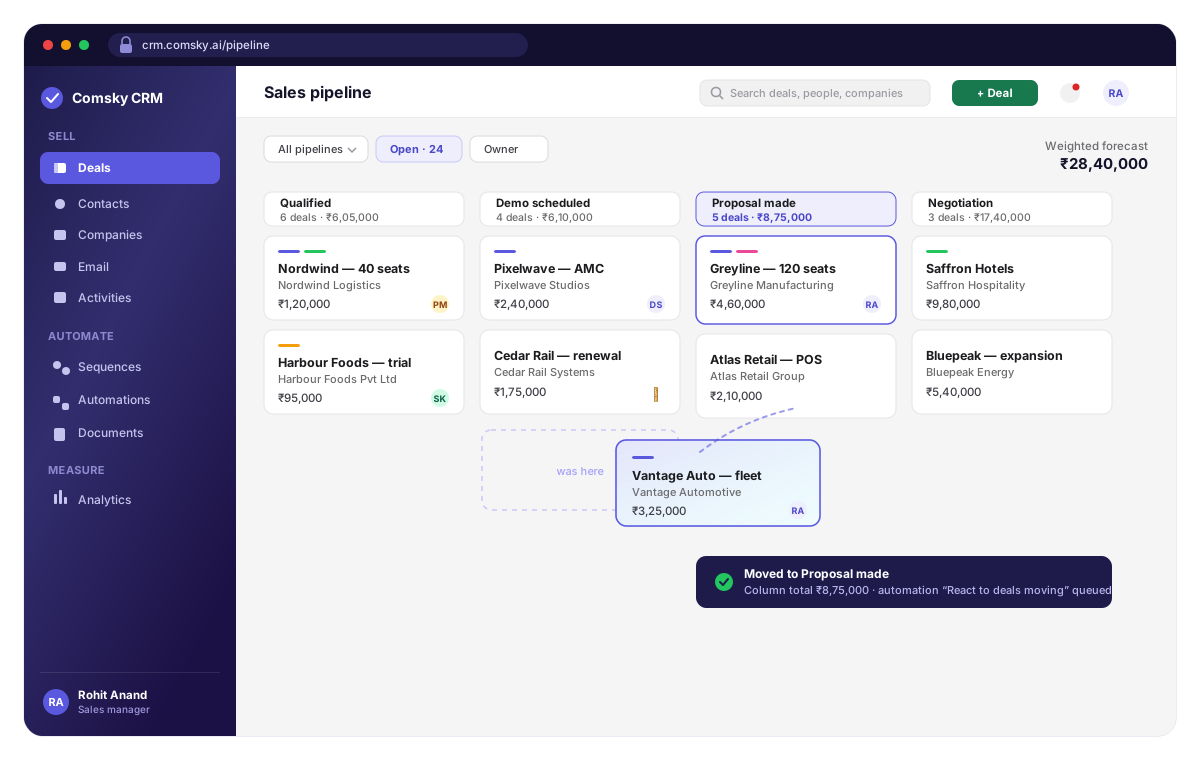
What you can check about us before you talk to anybody
Where would you like to start?
You already know what a pipeline is. The questions are whether your data survives the move, whether the thing bends to your process, and whether the reporting is better than what you have.
Nothing here assumes you have run a CRM before. These are the three jobs it does on day one — and each of them replaces something you are already doing by hand.
Move your pipeline over this afternoon.
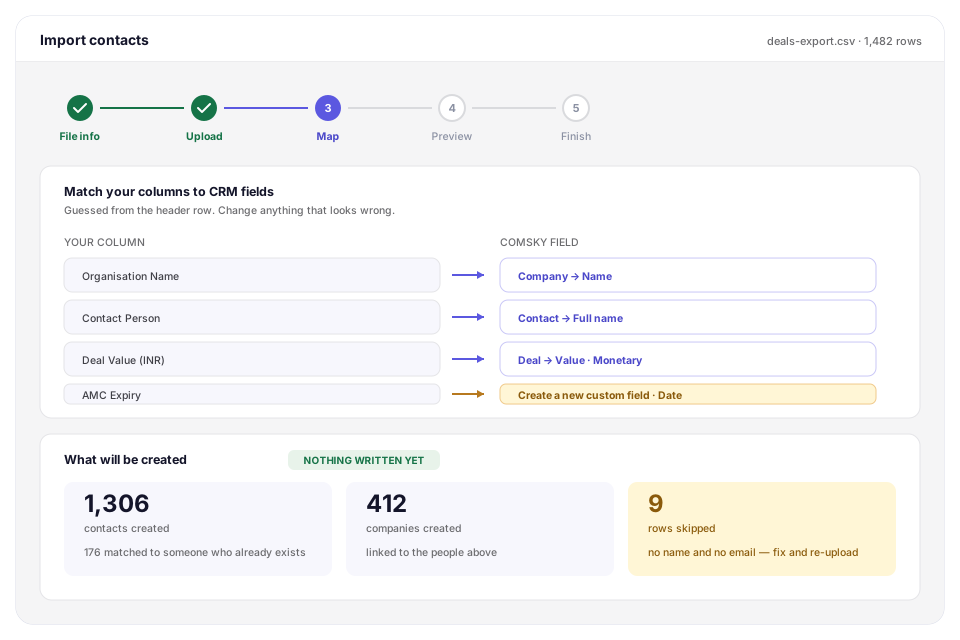
Export a file from whatever you use now and walk five steps: File info, Upload, Map, Preview, Finish. The Preview step shows you exactly what will be created before a single row is written.
- Columns matched to fields for you, and anything it guesses wrong you change on the spot
- A column with nowhere to go becomes a custom field instead of being dropped
- Contacts linked to the companies they belong to, in the same pass
- Rows that cannot be imported are listed with the reason rather than silently skipped
An implementation project. Most teams are importing a file their old CRM already exports — there is no discovery phase, no consultant and no six-week plan in between.
Shape it round how you sell.
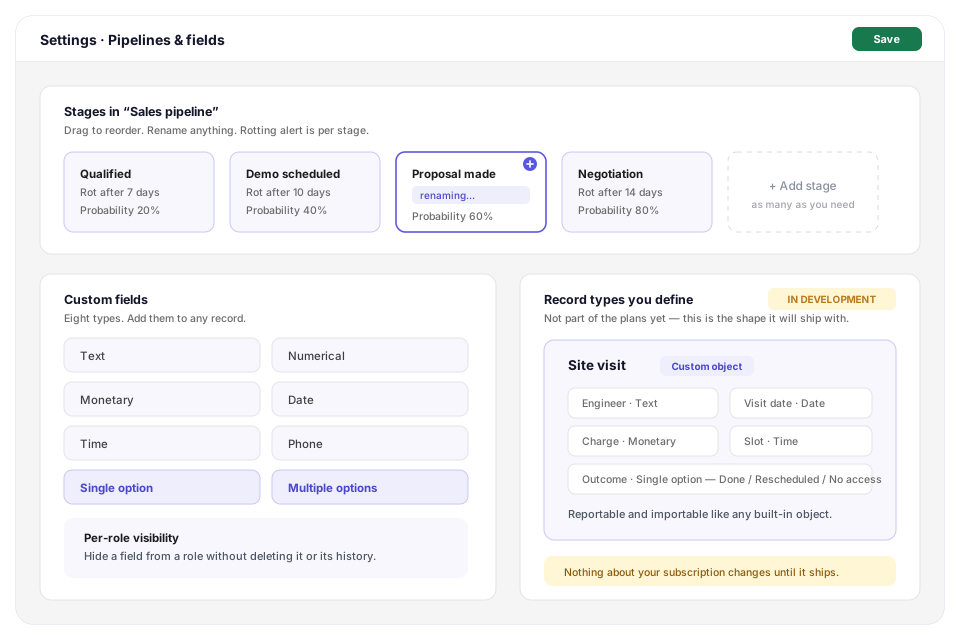
Pipelines, stages, fields and who can see them are yours to define. Not a template you work around, and not a configuration you pay a partner to perform.
- Multiple pipelines, with stages you name, reorder and set rotting alerts on
- Eight custom field types, including monetary and multiple-option
- Per-role visibility, so a field can be hidden from somebody without being deleted
- Record types you define yourself are in development, and not part of the plans yet
Working around somebody else's idea of a sales process — or paying for a configuration engagement before you have closed a deal in the thing.
Reports you build once, and stop rebuilding.
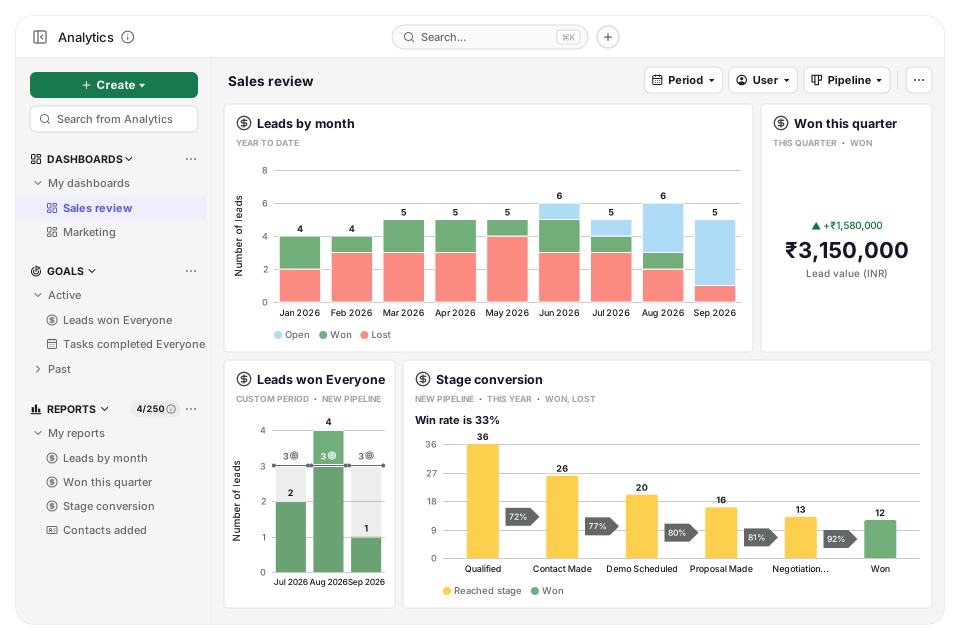
Pick what to report on — leads, tasks, emails, WhatsApp, contacts, companies or the revenue forecast — filter it, and choose what to measure and how to split it. Save it to a dashboard, then narrow the whole dashboard by period, user or pipeline in one go.
- Column, bar, pie, scorecard and table charts, plus a funnel and a win/loss view for conversion
- Goals with a target for every week, month, quarter or year, on the same dashboard as the reports
- A chart or a whole dashboard exports as PDF or PNG, and the records behind a report as CSV or Excel
- Share a dashboard with colleagues as viewer or editor, or as a public link that keeps itself up to date
Half a day at the end of every month rebuilding the same spreadsheet, and a number that changes depending on who built it.
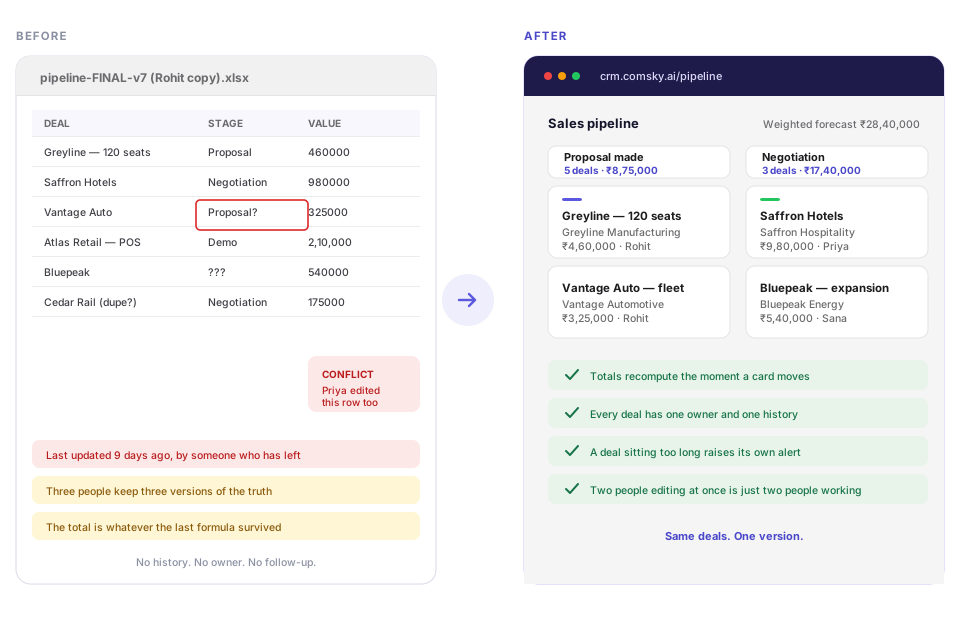
Get the pipeline out of the spreadsheet.
Every deal becomes a card in a column. Drag it to the next stage and the counts and totals move with it — which is the part a spreadsheet has never managed for more than a week at a time.
- Column counts and weighted totals recompute as you drag
- One owner and one history per deal, so nobody has to ask who is on it
- A deal that sits too long in a stage raises its own alert
- Two people working at once is just two people working, not a merge conflict
A pipeline spreadsheet: correct on the day it was updated, and wrong the moment two people open the same copy.
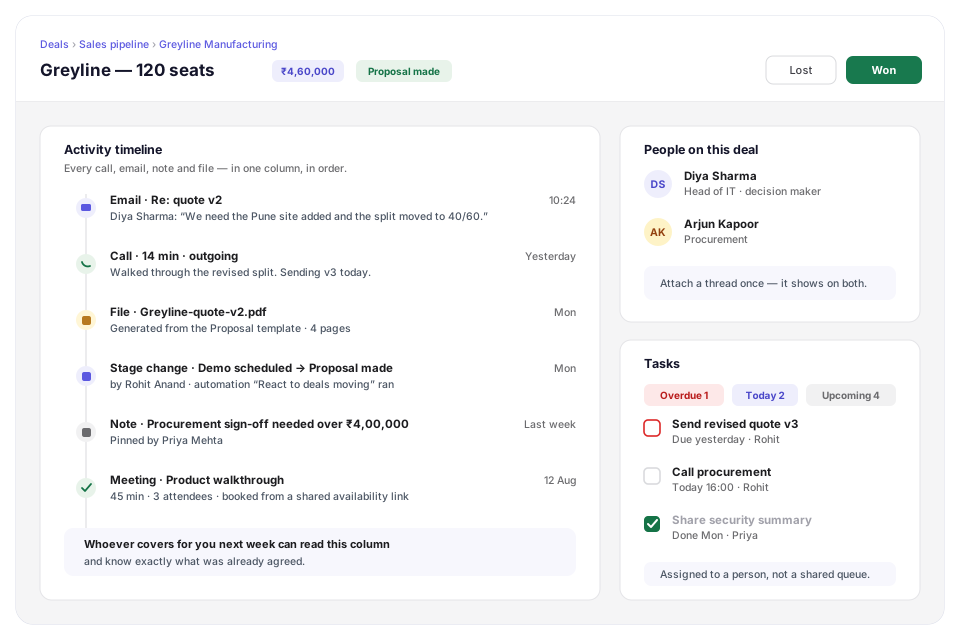
Every email, call and file in one column.
Connect the mailbox you already use and threads attach themselves to the right record in the background. The person covering for you next week reads one column and knows what was agreed.
- Gmail or Outlook, synced both ways, still sending from your own address
- Attach a thread once and it shows on the deal and on every contact in it
- Calls, meetings, notes, files and stage changes in order, with who did them
- Tasks grouped overdue / today / upcoming, assigned to a person rather than a queue
A shared inbox, where nobody can tell who replied — and where the history walks out of the door with whoever leaves.
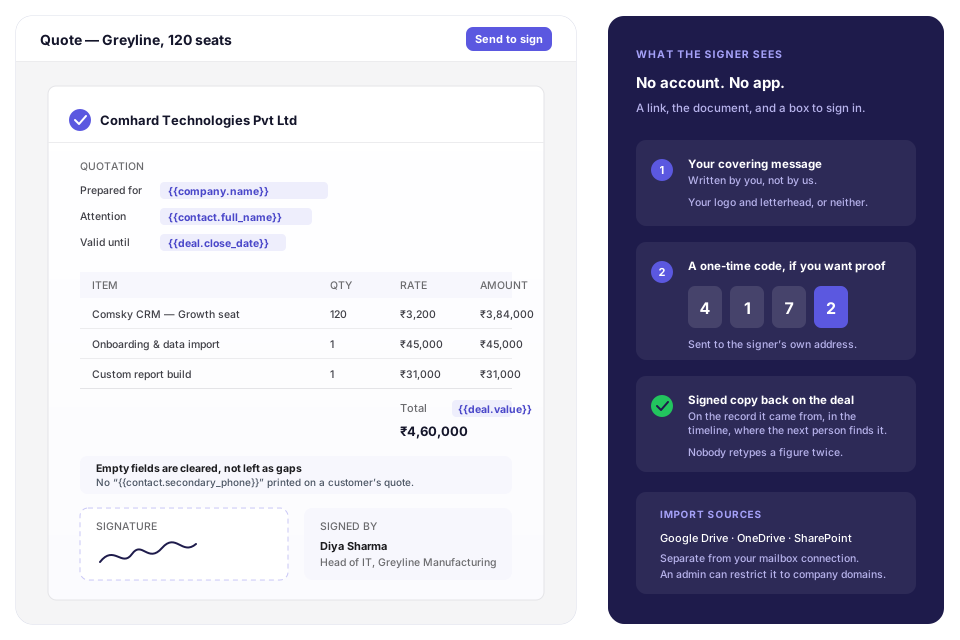
Quotes that already know the deal.
Build the template once. Every document drawn from it merges the record it was opened from — the company, the contact, the amount, your own custom fields — so nobody retypes a figure that is already in the CRM.
- A block editor, not a wall of raw HTML, and your logo and letterhead or neither
- Signed in the browser — the person signing needs no account and no app
- A one-time code to the signer, if you want proof it was them
- The signed copy stays on the record it came from, in the timeline
A folder of quote templates, where the version somebody sent is whichever copy happened to be on their desktop, at whatever rate it had last quarter.
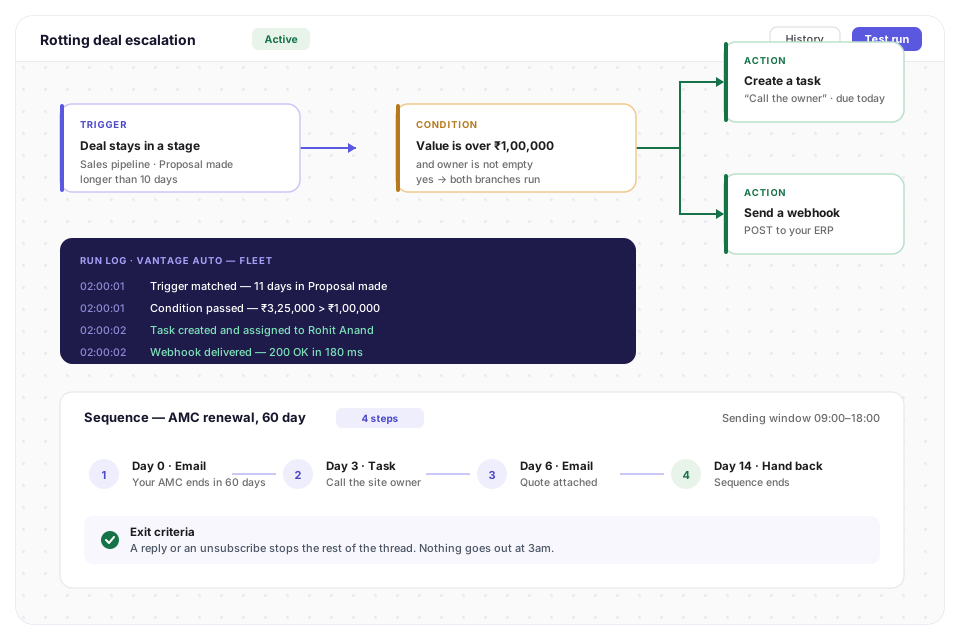
Follow-up that happens whether or not you remember.
Two different jobs, two different tools. Sequences are the human cadence you run at a person, and they stop the moment somebody replies. Automations are the rules the system enforces on every record, quietly, at 2am.
- 1A trigger you set once
A deal that has sat in a stage too long, a new lead, a field that changed, an activity that was completed. Six ready-made starters ship with the product, so most teams never open the builder at all.
- 2Actions that run without you
Update fields, assign an owner, create a task, send an email, enrol somebody in a sequence, or call an outbound webhook so your ERP hears about the won deal without anybody re-keying it.
- 3A run log per record
Every step that fired, with the time and the reason it fired. Which is what turns “the CRM changed it somehow” into a line you can read.
What it actually replaces.
Most teams we talk to are not moving off another CRM. They are moving off five things that each work fine alone and do not add up.
- A shared inboxNobody can tell who replied, and the history dies when someone leaves.
- A pipeline spreadsheetCorrect on the day it was updated. Two people edit it and the numbers no longer match.
- Calendar remindersThey fire whether or not the deal is still live, and they tell nobody else.
- A folder of quote templatesThe version somebody sent is whichever copy was on their desktop.
- A monthly report rebuilt by handHalf a day, every month, and the numbers change depending on who built it.
It has to fit what you already run.
Mail and calendar connect directly. Everything else goes through an API key or an outbound webhook, so your own internal systems connect too.
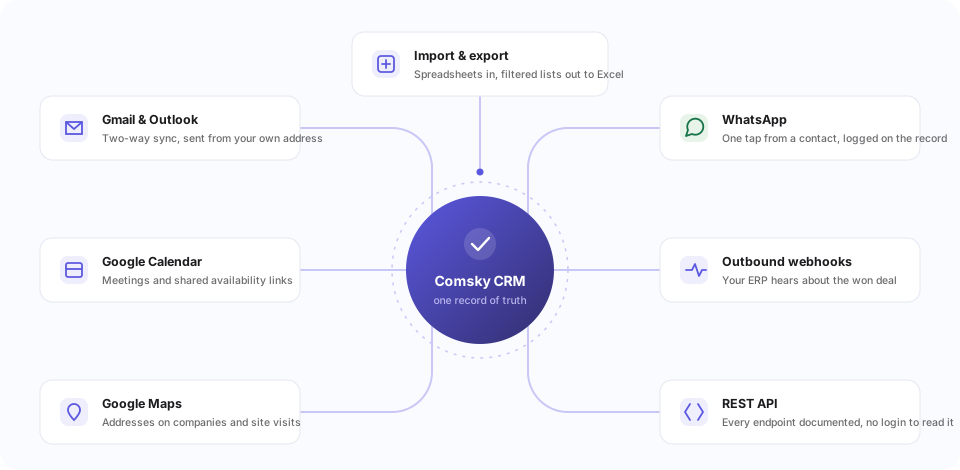
Comsky TallyBridge is the other half of this: your TallyPrime data on your phone, with dashboards and an AI analyst over your accounts. CRM is the front of the business — the pipeline before an invoice exists.
Where your records live, and who can read them.
The first questions in every procurement review, answered in the order they get asked.
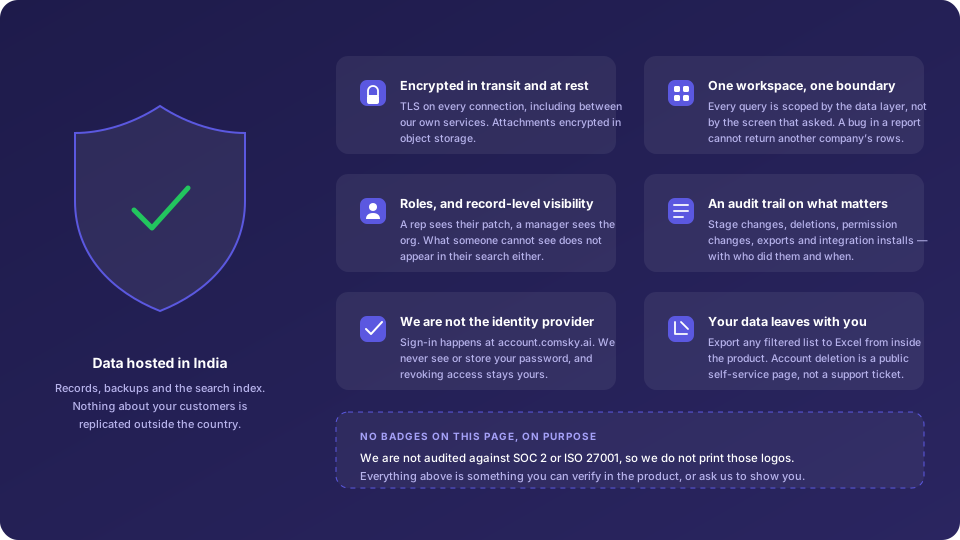
- Records, backups and the search index stay in India
- TLS on every connection, and encrypted at rest — including attachments
- One workspace, one boundary, enforced by the data layer rather than the screen
- Owner, admin and member, with record-level visibility on top
- Removing a user ends their session and releases their seat immediately
- An audit trail on stage changes, deletions, permission changes and exports
The things people ask before signing up.
Answers to the questions teams ask before they switch.
Fourteen days, the whole product, and no card. Nothing is held back for a paid tier while you are trying it — you get the automations, the sequences, the documents and the reports, not a cut-down version of them. Because there is no card on file, the trial cannot quietly turn into a subscription.
An afternoon for most teams, and no part of it needs us. Sign in, import a file, invite two colleagues — that is roughly eight minutes of work and some waiting. Connecting Gmail or Outlook is a few clicks. Shaping the pipelines, stages and fields is something you keep doing for a few weeks as you learn what you actually need, which is normal and is not a blocker to using it.
Yes, and from a spreadsheet too — a file is what every other CRM exports. The wizard walks File info, Upload, Map, Preview and Finish. It matches your columns to fields for you, a column with nowhere to go can become a custom field rather than being dropped, and the Preview step shows exactly what will be created — how many contacts, how many companies, how many rows it cannot use and why — before a single row is written.
Keep yours. You connect the mailbox you already use; mail still sends from your own address and still appears in your normal client. The CRM attaches the thread to the right record in the background, and a thread stays private to you until you attach it.
It is built for B2B teams from one person upward, and nothing about it changes shape when you add the tenth user — seats are per person per month, and roles with record-level visibility are there when you need them. Being straight about the other end: we have not run it at thousands of seats, so if that is where you are heading, ask us rather than assume.
Nothing dramatic. There is no card on file, so nothing is charged and nothing renews on its own. Pick a plan to keep working, or export your data and walk away. Your workspace is not deleted the moment the fourteen days are up.
Yes. There is no minimum seat count and no minimum term beyond the one you chose, so a monthly plan is cancellable monthly. Closing the account is a public self-service page rather than a support ticket and a retention call, and your data stays exportable for thirty days afterwards.
In India — the records, the backups and the search index, encrypted in transit and at rest. Every query is scoped to your workspace by the data layer rather than by the screen that asked, sign-in happens at your identity provider so we never see a password, and stage changes, deletions, permission changes and exports are all in an audit trail. We are not audited against SOC 2 or ISO 27001 and we do not print those badges; the security page says exactly what we do and do not do.
Export any filtered list view to Excel from inside the product, whenever you like, without asking us — and the whole workspace through the API. It is a feature you use, not a request you make of us, which is the difference between being able to leave and being told you could.
Email [email protected] or phone us, Monday to Friday, 10:00 to 18:00 IST. We aim to respond first within one business day, and a response means a person has read your message and told you what is happening — not an automated acknowledgement. We do not claim 24/7 cover, because we do not have it.
A record type you define yourself — name it, give it fields from eight types, and set who can see it per role — for the things deals, contacts and companies do not cover: the site visit, the AMC, the machine under warranty. It is in development and not part of the plans yet. We list it because people ask, not because you can buy it today.
Not on the stores yet. They are in internal testing, and we would rather say so than put a badge on this page that takes you nowhere. The web app is live and complete today, and the apps read the same records when they ship.
Comsky TallyBridge puts your TallyPrime data on your phone, with dashboards, BI and an AI analyst over your accounts. Comsky CRM is the front of the business — the pipeline, the conversations and the follow-up, before an invoice exists. They are separate products, and you do not need one to use the other.
See your own pipeline in it this afternoon.
Not a sandbox with sample data — your deals, your people, your stages. If it is not for you, export everything and walk away; nothing is deleted and nothing renews on its own.
- 1 Sign in1 min
With Google or an email address. No card, no sales call first.
- 2 Import your list5 min
A CSV from a spreadsheet or your old CRM. The preview shows exactly what will be created before anything is written.
- 3 Invite two colleagues2 min
See it with your own deals in it, with the people who will actually use it.